Maintenance Business Process Mapping & Software.
Disclaimer.
This article provides
general information about maintenance process mapping and software tools based
on industry practices and publicly available information. It does not
constitute professional consulting advice.
Organisations should
evaluate their specific requirements, regulatory obligations and operational
context before implementing process mapping initiatives or selecting software
tools.
Software features,
pricing and capabilities mentioned in this article may change over time.
Readers should verify current product specifications directly with vendors
before making purchasing decisions. The author is not affiliated with any
software vendors mentioned in this article.
Views, thoughts,
opinions & ideas expressed are those of the author only.
Article Summary.
Maintenance
organisations frequently struggle with CMMS implementations that fail to
deliver expected results.
The root cause is
typically not the software itself, but unclear, undocumented, or poorly
understood maintenance processes.
Process mapping
addresses this gap by creating visual, structured representations of how
maintenance work flows through an organisation.
This article explains
maintenance business process mapping from foundation to implementation.
It defines what
process mapping is, identifies which core maintenance processes require mapping
and details the different levels of process detail from high-level value chains
to detailed work instructions.
Provided is some practical
guidance for facilitating process mapping workshops, including preparation,
execution, validation and publication steps.
A comprehensive
comparison of leading software tools examines general process mapping platforms
(Lucidchart, Microsoft Visio, Miro), enterprise architecture tools (ARIS),
BPMN-compliant solutions (Bizagi Modeler) and CMMS-embedded workflow
capabilities.
Included is also a
decision matrix to guide tool selection based on organisational needs.
Finally, the article
explains how process maps translate into CMMS configuration through status
codes, notifications, approvals and automation rules.
It concludes with
common mistakes organisations make during process mapping and how to avoid
them.
Top 5 Takeaways.
1.
CMMS failures
stem from unclear processes, not inadequate software. Organisations must document and understand their
maintenance processes before configuring systems. Process mapping provides the
foundation for successful CMMS implementation and digital transformation.
2.
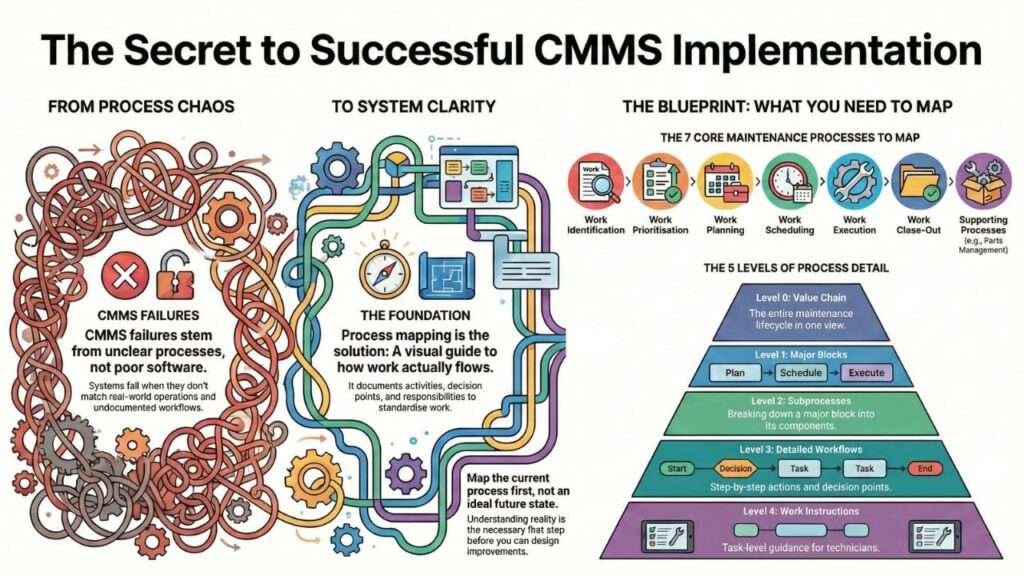
Seven core
maintenance processes require mapping:
work identification, prioritisation, planning, scheduling, execution, close-out
and supporting processes. Each involves distinct workflows, decision points and
data requirements that must be clearly defined.
3.
Process
mapping operates at five levels of detail: value chain (Level 0), major process blocks (Level 1),
subprocesses (Level 2), detailed workflows (Level 3) and work instructions
(Level 4). Different audiences and purposes require different levels of detail.
4.
Tool selection
depends on organisational needs, not just features. Small organisations may need only collaborative cloud
tools like Lucidchart or Miro, while large enterprises with strict governance
requirements may need enterprise platforms like ARIS. BPMN-compliant tools like
Bizagi bridge process mapping and workflow automation.
5.
Process
mapping is continuous, not a one-time project. Maps must be validated against field reality, updated
when processes change and maintained as living documents that reflect current
practice. Treating process mapping as a project to complete before CMMS implementation
leads to outdated documentation.
Table of Contents.
1.0 Why Process Mapping Is the Missing Link in
Maintenance Excellence.
2.0 What Is Maintenance Business Process Mapping?
2.1 Definition.
2.2 Why It Matters.
3.0 The Core Maintenance Processes That Must Be Mapped
3.1 Work Identification.
3.2 Work Prioritisation.
3.3 Work Planning.
3.4 Work Scheduling.
3.5 Work Execution.
3.6 Work Close-Out.
3.7 Supporting Processes.
4.0 The Levels of Process Mapping.
4.1 Level 0 – Value Chain.
4.2 Level 1 – Major Process Blocks.
4.3 Level 2 – Subprocesses.
4.4 Level 3 – Detailed Workflows.
4.5 Level 4 – Work Instructions.
5.0 How to Facilitate a Maintenance Process Mapping
Workshop.
5.1 Preparation.
5.2 Running the Workshop.
5.3 Validating the Map.
5.4 Finalising and Publishing.
6.0 Software Tools for Maintenance Process Mapping.
6.1 Categories of Tools.
7.0 Comparison of Leading Process Mapping Tools for
Maintenance.
7.1 Lucidchart.
7.2 Microsoft Visio.
7.3 Miro.
7.4 ARIS.
7.5 Bizagi Modeler.
7.6 CMMS-Embedded Workflow Tools.
8.0 How to Choose the Right Tool for Your Organisation.
8.1 Key Decision Criteria.
8.2 Decision Matrix.
9.0 How Process Maps Integrate With CMMS Configuration .
9.1 Translating Maps Into CMMS Workflows.
9.2 Ensuring Data Alignment.
9.3 Testing and Validation.
10.0 Common Mistakes in Maintenance Process Mapping.
10.1 Mapping the Ideal Process Instead of the Real One.
10.2 Overcomplicating Diagrams.
10.3 Not Involving Frontline Workers.
10.4 Failing to Update Maps After CMMS Changes.
10.5 Treating Mapping as a One-Off Project.
11.0 Conclusion.
12.0 Bibliography.
1.0 Why Process Mapping Is the Missing Link in
Maintenance Excellence.
Maintenance
organisations face a recurring problem: CMMS implementations that fail to
deliver expected results.
The issue is rarely
the software itself. Instead, failure stems from unclear, undocumented, or
poorly understood maintenance processes.
When processes exist
only in the heads of experienced technicians or as outdated procedure
documents, organisations cannot standardise work, maintain compliance, train
new staff effectively, or implement digital transformation successfully.
Process mapping
addresses this gap by creating a visual, structured representation of how
maintenance work flows through an organisation.
Process mapping
serves as the foundation for standardisation, regulatory compliance, training
programs, CMMS configuration and continuous improvement initiatives.
Without clear process
maps, organisations implement software that does not match real-world
operations, leading to workarounds, poor data quality and eventually, system
abandonment.
This article explains
what maintenance process mapping is, which processes require mapping, how to
facilitate mapping workshops, which software tools support the work and how to
integrate process maps with CMMS configuration.
2.0 What Is Maintenance Business Process Mapping?
2.1 Definition.
Maintenance business
process mapping is a structured method for visualising how maintenance work
flows through an organisation.
It documents the
sequence of activities, decision points, responsibilities, inputs and outputs
involved in maintenance operations.
Process mapping
differs from related concepts:
1.
Process maps show the flow of activities across functions or
departments.
2.
Workflows define the sequence of steps within a single process.
3.
Procedures provide detailed instructions for completing specific
tasks.
4.
Work
instructions offer step-by-step
guidance for individual activities.
Process maps
typically sit at a higher level than procedures, showing how different
activities connect rather than how to perform each activity.
2.2 Why It Matters.
Process mapping
reduces variation in how maintenance work is performed.
When multiple
planners, supervisors, or technicians handle similar work differently,
reliability outcomes become inconsistent and unpredictable.
Clear process maps
ensure CMMS configuration matches real-world operations.
Many organisations
configure their CMMS based on vendor recommendations or generic best practices,
then struggle when the system does not support their actual workflows.
Process maps enable
automation and optimisation. Without understanding the current process,
organisations cannot identify bottlenecks, eliminate waste, or implement
workflow automation effectively.
For organisations subject
to regulatory oversight, process maps support audits by demonstrating that
documented procedures are followed consistently.
They also facilitate
training by showing new employees how work flows through the system.
3.0 The Core Maintenance Processes That Must Be Mapped.
3.1 Work Identification.
Work identification
encompasses all sources of maintenance work and how that work enters the
system.
Sources of work
include:
1.
Condition monitoring
alerts.
2.
Operator observations.
3.
Preventive maintenance
schedules.
4.
Predictive maintenance
recommendations.
5.
Breakdown reports.
6.
Regulatory inspections.
7.
Project work.
8.
Improvement initiatives.
Each source may
require different trigger types and data fields.
A condition
monitoring alert might include sensor readings and trend analysis, while an
operator observation might include location, equipment symptoms and safety
concerns.
3.2 Work Prioritisation.
Work prioritisation
determines which identified work receives attention first.
Risk-based
prioritisation considers the probability and consequence of failure if work is
delayed.
Effective
prioritisation integrates asset criticality, safety implications, operational
impact, regulatory requirements and resource availability.
The process must
define who has authority to override standard prioritisation rules and under
what circumstances.
3.3 Work Planning.
Work planning defines
the scope of work, identifies required parts and tools, secures necessary
permits and gathers relevant documentation before work begins.
The planning process
determines:
1.
What tasks will be
performed.
2.
How long tasks will take.
3.
Which skills are required.
4.
What materials are needed.
5.
Which safety procedures
apply.
6.
What isolation or lockout
steps are necessary.
7.
What drawings, manuals, or
technical references are needed.
Planning quality
directly affects schedule compliance and first-time-right completion rates.
3.4 Work Scheduling.
Work scheduling
assigns planned work to specific time slots and resources. Weekly scheduling is
common, though frequency varies by organisation.
The scheduling
process balances resource availability, priority levels, operational
constraints and shutdown or turnaround requirements.
Schedulers must
coordinate with operations to identify equipment availability windows and
resolve conflicts when multiple high-priority jobs compete for the same
resources or time slots.
3.5 Work Execution.
Work execution
encompasses all activities from job assignment through task completion. Field
workflows vary significantly based on whether technicians use mobile devices,
paper work orders, or a combination.
Execution processes
must address:
1.
Job acceptance by
technicians.
2.
Pre-job safety briefings.
3.
Isolation and lockout
procedures.
4.
Task performance and
verification.
5.
In-field issue resolution.
6.
Emergency response
protocols.
7.
Real-time status updates.
Execution workflows
that work well in an office environment often fail in field conditions where
connectivity is limited or safety gear restricts device use.
3.6 Work Close-Out.
Work close-out
ensures that completed work is properly documented, equipment is returned to
service safely and relevant data is captured for future analysis.
Close-out processes
address:
1.
Completion confirmation.
2.
Time and material
recording.
3.
Failure mode and cause
coding.
4.
Equipment condition assessment.
5.
Lessons learned
documentation.
6.
Work quality verification.
7.
Follow-up work
identification.
Data quality at
close-out determines the value of maintenance records for reliability analysis,
cost tracking and performance measurement.
3.7 Supporting Processes.
Supporting processes
enable core maintenance workflows but are not directly part of work execution.
Asset creation and
modification processes ensure equipment records remain accurate as assets are
added, modified, or removed.
These processes must
define when asset records are created, what information is mandatory, how asset
hierarchies are maintained and who has authority to make changes.
Spare parts
management processes govern how parts are identified, procured, stored, issued
and tracked.
Integration between
work planning and inventory systems depends on clear processes for part
reservation, kitting and return of unused materials.
Contractor management
processes define how external service providers are engaged, supervised and
paid.
These processes must
address contractor qualification, work assignment, safety oversight, quality
verification and invoice approval.
Reliability
engineering workflows support failure analysis, maintenance strategy
development and continuous improvement.
These processes connect
data from work execution back to planning and scheduling through formal review
cycles.
4.0 The Levels of Process Mapping.
4.1 Level 0 – Value Chain.
Level 0 maps show the
entire maintenance lifecycle in one view. They typically include five to ten major
process blocks that represent the flow from work identification through
completion.
A Level 0 map
provides context but little detail. It helps stakeholders understand where a
specific process fits within the broader maintenance system.
4.2 Level 1 – Major Process Blocks.
Level 1 maps expand
the value chain into major process blocks.
A typical Level 1 map
shows:
Identification → Prioritisation → Planning → Scheduling → Execution → Close-Out
Each block represents
a distinct phase with defined inputs, outputs and responsibilities.
Level 1 maps show
handoffs between departments or functional groups.
4.3 Level 2 – Subprocesses.
Level 2 maps break
major process blocks into subprocesses.
For work planning,
Level 2 might show:
1.
Receive work notification.
2.
Review equipment history.
3.
Identify scope of work.
4.
Estimate duration.
5.
List required parts.
6.
List required tools.
7.
Identify safety
requirements.
8.
Obtain technical
documentation.
9.
Update work order.
10.
Return to scheduling.
Level 2 maps show
enough detail for process improvement discussions without overwhelming viewers
with task-level steps.
4.4 Level 3 – Detailed Workflows.
Level 3 maps document
step-by-step actions, decision points and system interactions. They typically show:
1.
Specific data fields that
must be completed.
2.
Approval requirements.
3.
System screens or forms
used.
4.
Exception handling.
5.
Escalation paths.
6.
Quality checks.
Level 3 maps guide
CMMS configuration and support detailed training.
They answer questions
like “What happens if the planner cannot obtain parts?” or “Who
approves high-priority work?”
4.5 Level 4 – Work Instructions.
Level 4 documents
provide task-level detail for specific activities.
These are typically
written procedures rather than visual process maps.
Work instructions
include:
1.
Step-by-step task guidance.
2.
Safety requirements.
3.
Quality standards.
4.
Required tools and
materials.
5.
Verification steps.
6.
Sign-off requirements.
Level 4 documents
support technicians performing work, while Level 3 maps support supervisors and
planners managing workflows.
5.0 How to Facilitate a Maintenance Process Mapping
Workshop.
5.1 Preparation.
Successful process
mapping begins before the workshop.
Facilitators should
gather existing procedures, identify process owners and define scope and
boundaries clearly.
Existing procedures
may be incomplete or outdated, but they provide a starting point for
discussion.
Reviewing these
documents helps identify gaps and inconsistencies that the workshop must
resolve.
Process owners are
individuals responsible for how work is performed. For work planning, the chief
planner is typically the process owner.
For work execution, the maintenance supervisor or area lead
fills this role. Process owners must attend the workshop and have authority to
make decisions about how the process should work.
Scope definition
prevents workshops from expanding into unproductive debates about tangential
issues.
A workshop focused on
work order creation should not attempt to redesign the entire maintenance
strategy.
5.2 Running the Workshop.
Process mapping
workshops require the right participants, clear facilitation and structured
discussion.
Whiteboard mapping
works well for initial sessions.
Physical sticky notes
allow participants to move steps around easily as they refine the process.
Digital tools like
Miro support remote participants and provide built-in templates.
The right people in
the room include process owners, experienced practitioners and representatives
from groups that interact with the process.
A work planning
workshop needs planners, schedulers, technicians and inventory staff. Without
technician input, the resulting process may not reflect field realities.
Disagreements are
common when multiple experienced practitioners have different interpretations
of “how things work.”
The facilitator must
distinguish between:
1.
Differences in how people
currently perform the process (variation that should be eliminated).
2.
Legitimate exceptions
based on equipment type, location, or other factors.
3.
Fundamental disagreements
about how the process should work.
For current-state
mapping, the goal is to document how work actually flows, not how it should
flow ideally.
Future-state mapping
can address improvements, but mixing current and future state creates
confusion.
Exceptions and
variations must be captured but should not obscure the standard process. If 90%
of work follows a common path, map that path clearly and note exceptions
separately.
5.3 Validating the Map.
Process maps created
in a conference room may not reflect actual practice. Validation confirms that
the documented process matches reality.
Walkthroughs involve
presenting the process map to stakeholders who did not attend the workshop.
Fresh eyes often spot
gaps or inconsistencies that participants missed.
Shadowing means
following a practitioner through an actual work cycle and comparing their
actions to the mapped process.
Shadowing reveals
workarounds, unwritten rules and steps that practitioners perform instinctively
but did not mention during the workshop.
Field verification is
particularly important for execution processes.
Office-based process
owners may not fully understand how field conditions affect workflow.
A five-minute data
entry step in a clean office becomes difficult when wearing gloves in a noisy
plant environment.
5.4 Finalising and Publishing.
Validated process
maps require version control, formal approval and communication.
Version control
ensures that everyone references the current process. Changes should be tracked
with version numbers, dates and change descriptions.
Approval workflows
depend on organisational governance. Some organisations require formal sign-off
from department heads, while others rely on process owner approval.
Communication and
training ensure that documented processes are followed. Publishing a process
map without training staff on changes leads to continued use of old methods.
Training should
explain not just what changed, but why the new process improves outcomes.
6. Software Tools for Maintenance Process Mapping.
6.1 Categories of Tools.
Process mapping tools
fall into several categories, each with different strengths.
General process
mapping tools like Lucidchart, Microsoft Visio and Miro focus on creating
visual diagrams.
They offer intuitive
interfaces, templates and collaboration features but lack deep integration with
enterprise systems.
Enterprise
architecture tools like ARIS provide governance, version control and repository
management.
They support large
organisations with complex approval workflows and regulatory requirements but
require more training and investment.
CMMS-native workflow
tools exist within maintenance management systems. SAP PM, IBM Maximo and other
enterprise CMMS platforms include workflow configuration capabilities.
These tools align
directly with system configuration but are not ideal for early-stage mapping or
collaborative workshops.
Low-code automation
platforms like Bizagi combine process mapping with workflow automation.
They support BPMN
standards and can generate executable workflows from process models.
7.0 Comparison of Leading Process Mapping Tools for
Maintenance.
7.1 Lucidchart.
Lucidchart is a
cloud-based diagramming tool with strong collaboration features.
Strengths include
intuitive drag-and-drop interface, real-time collaboration, extensive shape
libraries and integration with productivity tools like Google Workspace and
Microsoft Office.
Teams can work
simultaneously on the same diagram, making it effective for workshops.
Weaknesses include
limited enterprise architecture capabilities, basic version control and no
built-in governance workflow.
Lucidchart works well
for creating and sharing process maps but does not support complex approval
processes or regulatory documentation requirements.
Best for small to
medium organisations that need rapid mapping capabilities and collaborative
features without enterprise governance overhead.
7.2 Microsoft Visio.
Microsoft Visio is
the long-standing industry standard for process diagramming.
Strengths include
comprehensive shape libraries, integration with the Microsoft ecosystem,
offline capability and familiarity among business analysts.
Visio files integrate
with SharePoint for version control and can be embedded in other Microsoft
applications.
Weaknesses include
less intuitive collaboration compared to cloud-native tools, steeper learning
curve for new users and separate desktop and web versions with different
feature sets.
Real-time
collaboration requires Visio for the web, which has fewer features than the desktop
application.
Best for
organisations already using Microsoft 365 who need offline capability and
integration with existing Microsoft infrastructure.
7.3 Miro.
Miro is a digital
whiteboard platform designed for workshops and collaboration.
Strengths include
excellent workshop facilitation features, real-time collaboration with no lag,
intuitive interface and extensive template library.
Miro supports sticky
notes, voting, timers and other workshop tools that physical whiteboards cannot
match.
Weaknesses include
less structure for formal process documentation, limited export options for
final diagrams and features that emphasise brainstorming over governance.
Miro excels at
capturing ideas but requires translation to more formal tools for final
documentation.
Best for early-stage
mapping sessions, collaborative workshops and organisations that prioritise
idea generation over formal documentation.
7.4 ARIS.
ARIS (Architecture of
Integrated Information Systems) by Software AG is an enterprise architecture
tool.
Strengths include
comprehensive governance features, robust version control, repository
management for storing all process models centrally and compliance support for
regulatory requirements.
ARIS supports
multiple modeling notations and can link processes to systems, roles, risks and
other objects.
Weaknesses include
high cost, complexity that requires dedicated training and limited
collaboration features compared to modern cloud tools.
ARIS targets
enterprise architecture teams rather than casual users.
Best for large
organisations with strict compliance needs, formal governance requirements and
dedicated business process management teams.
7.5 Bizagi Modeler.
Bizagi Modeler is a
free BPMN-compliant process modeling tool.
Strengths include
full BPMN 2.0 support, free version with substantial functionality,
automation-ready models that can be executed in Bizagi’s workflow engine and
documentation generation from process models.
Bizagi bridges the
gap between process mapping and workflow automation.
Weaknesses include
limited collaboration in the free version, steeper learning curve for users
unfamiliar with BPMN notation and less intuitive interface compared to tools
like Lucidchart or Miro.
Best for
organisations that want to adopt BPMN standards, plan to automate workflows in
the future, or need formal process documentation without enterprise tool costs.
7.6 CMMS-Embedded Workflow Tools.
Major CMMS platforms
include workflow configuration tools within the system.
Strengths include
direct alignment with system configuration, ability to test workflows in the
actual application and no data translation between mapping and implementation.
What you configure is
what users get (experience).
Weaknesses include
poor support for early-stage collaborative mapping, limited visual design
capabilities compared to dedicated mapping tools and requiring CMMS access for
all workshop participants.
CMMS workflow tools
assume you already know what the process should be.
Best for final
workflow validation after process mapping is complete elsewhere and for making
incremental changes to established workflows.
8.0 How to Choose the Right Tool for Your Organisation.
8.1 Key Decision Criteria.
Tool selection
depends on organisational needs rather than tool features alone.
Organisation size and
maturity affect governance requirements. Small organisations may need only
basic collaboration and version control, while large enterprises require formal
approval workflows, audit trails and repository management.
Collaboration needs
vary by mapping approach. Organisations running intensive workshops need
real-time collaboration features.
Organisations where a
business analyst creates maps independently then reviews them with stakeholders
can use less collaborative tools.
Governance
requirements depend on regulatory environment and organisational culture.
Highly regulated industries may need tools that support ISO 9001, FDA, or other
compliance frameworks. Other organisations may have minimal governance needs.
CMMS integration
matters when organisations want to link process maps directly to system
configuration. Some tools offer API connections or data export formats
compatible with CMMS platforms.
Budget ranges from
free tools to enterprise licenses costing thousands per user annually. Budget
constraints may limit options, but free and low-cost tools can be effective for
many organisations.
User skill level
affects tool selection. Tools requiring BPMN expertise or extensive training
work well when dedicated staff manage process documentation. Simpler tools suit
organisations where process mapping is one responsibility among many.
8.2 Decision Matrix.
|
Tool |
Cost |
Ease of Use |
Collaboration |
BPMN Support |
CMMS Integration |
Governance |
|
Lucidchart |
Medium |
High |
High |
Basic |
Limited |
Basic |
|
Visio |
Medium |
Medium |
Medium |
Medium |
Medium |
Medium |
|
Miro |
Low-Medium |
High |
High |
None |
None |
Minimal |
|
ARIS |
High |
Low |
Low |
High |
High |
High |
|
Bizagi |
Free-Medium |
Medium |
Low |
High |
Medium |
Medium |
|
CMMS Tools |
Included |
Low-Medium |
Low |
Varies |
Native |
Varies |
This matrix provides
general guidance.
Specific needs may make
a tool with apparent weaknesses the best choice for a particular organisation.
9.0 How Process Maps Integrate With CMMS Configuration.
9.1 Translating Maps Into CMMS Workflows.
Process maps guide
CMMS workflow configuration by defining required status codes, notifications,
approvals and automation rules.
Status codes in the
CMMS should match process steps in the map.
If the process map
shows work moving from “Identified” to “Prioritised” to
“Planning” to “Ready to Schedule” to “Scheduled”
to “In Progress” to “Complete,” the CMMS needs
corresponding status codes.
Notifications alert
stakeholders when work reaches specific process steps.
The process map
identifies who needs notification and under what conditions.
For example,
maintenance supervisors might receive notification when high-priority work is
identified, while planners receive notification when work enters the planning
queue.
Approvals control
workflow progression. The process map defines who must approve work before it
advances to the next step.
Emergency work might
bypass normal approvals, while major projects might require multiple approval
levels.
Automation rules
execute actions automatically based on process logic.
If the process map
shows that work assigned to electricians automatically goes to the electrical
supervisor’s queue, the CMMS workflow should implement this rule without manual
intervention.
9.2 Ensuring Data Alignment.
Process maps identify
data requirements at each process step. CMMS configuration must enforce data
quality through required fields, validation rules and structured data entry.
Required fields
prevent work from advancing until necessary information is captured. If the
planning process requires estimated duration before work can be scheduled, the
CMMS should make this field mandatory at the appropriate status.
Failure coding
schemes must support the reliability analysis workflows shown in the process
map.
If the process
includes root cause analysis for critical equipment failures, the CMMS needs
failure mode, failure cause and corrective action fields structured to support
this analysis.
Asset hierarchy in
the CMMS must match how the process map references equipment. If the process
map shows that work is prioritised based on asset criticality, the CMMS must
maintain current criticality ratings for all equipment.
9.3 Testing and Validation.
Process maps provide
the basis for testing CMMS configuration through user acceptance testing (UAT).
UAT scenarios walk
through each process step using the configured CMMS.
Test scenarios should
cover standard workflows, exception handling and edge cases identified during
process mapping.
Pilot groups test
workflows in real operations before full deployment.
Pilot testing reveals
issues that workshop participants and UAT teams miss, particularly around field
usability and integration with other systems.
Feedback loops
capture issues and improvement opportunities after go-live.
The process map
provides the baseline for evaluating whether the CMMS supports the intended
workflow or whether configuration changes are needed.
10.0 Common Mistakes in Maintenance Process Mapping.
10.1 Mapping the Ideal Process Instead of the Real One.
Process mapping
workshops often drift toward designing an ideal future state rather than
documenting current reality. While improvement is valuable, mixing current and
future state creates confusion.
Map the current
process first, even if it is inefficient or inconsistent. Understanding current
state is necessary for designing improvements.
Attempting to skip
directly to an ideal future state typically results in a process map that looks
good on paper but does not reflect what actually happens.
10.2 Overcomplicating Diagrams.
Process maps can
become so detailed that they are difficult to read and maintain. A map showing
every possible exception, decision point and data field becomes unusable.
Focus each map on the
appropriate level of detail for its audience.
Level 1 maps for
executives should not show individual data fields.
Level 3 maps for CMMS
configuration should not try to fit the entire maintenance process on one page.
10.3 Not Involving Frontline Workers.
Process maps created
solely by managers or business analysts often miss critical details about how
work actually happens.
Frontline
technicians, planners and schedulers know workarounds, unwritten rules and
field realities that supervisors may not see.
A work execution
process designed without technician input will likely not work when
implemented.
10.4 Failing to Update Maps After CMMS Changes.
Process maps become
outdated when the CMMS is modified but documentation is not updated. Over time,
the gap between documented process and actual workflow grows.
Process maps require
version control and regular review. When CMMS configuration changes, update the
corresponding process maps.
When new staff are
trained using outdated process maps, they learn workflows that no longer match
the system.
10.5 Treating Mapping as a One-Off Project.
Organisations
sometimes view process mapping as a project to complete before CMMS
implementation, then never revisit the maps.
Process mapping should be continuous. As organisations mature, processes evolve. New equipment types, regulatory requirements, or operational strategies may require process changes.
Process maps should be living documents that reflect current practice and support ongoing improvement.
11.0 Conclusion.
A strong maintenance organisation isn’t built on software alone, it’s built on clarity, consistency and a deep understanding of how work actually flows.
Hopefully, this article makes this clear: most CMMS failures stem not from the system, but from unclear, inconsistent or undocumented processes.
Maintenance business process mapping closes that gap by turning tribal knowledge and scattered practices into structured, validated workflows that everyone can see, understand and follow.
This becomes especially critical when an organisation is considering a new CMMS, AMS or ERP. Purchasing software without first mapping the ‘as‑is’ process is like designing a house without a blueprint.
A high‑quality current‑state map shows exactly how work is identified, prioritised, planned, scheduled, executed and closed out in reality, not in assumptions or vendor demos.
It exposes bottlenecks, variations, data gaps and decision points that must be understood before any system can be configured to support them.
Once the ‘as‑is’ process is documented at the right level of detail, it becomes the foundation for designing the ‘to‑be’ process.
This future‑state design is where improvements, automation opportunities, governance changes and digital workflows can be introduced with confidence.
Because the baseline is accurate, the future state is realistic. Because the future state is clear, the CMMS configuration aligns with actual business needs.
And because the process is mapped, the organisation avoids the common trap of implementing software that doesn’t match real operations, a root cause of poor adoption and system abandonment highlighted throughout this article.
In short, maintenance business process mapping is not an optional pre‑implementation task; it is the strategic backbone of successful system selection, configuration and long‑term operational excellence.
When done well, it ensures that technology enhances the way your organisation works rather than forcing workarounds, rework or confusion.
It transforms a CMMS purchase from a risky leap into a confident, well‑designed step toward reliability, efficiency and continuous improvement.
12.0 Bibliography.
1. Maintenance and Reliability Best Practices – Ramesh Gulati
2. Maintenance Planning and Scheduling Handbook – Richard D. Palmer
3. Asset Management Excellence: Optimizing Equipment Life-Cycle Decisions – John D. Campbell & Andrew K.S. Jardine
4. Business Process Change: A Business Process Management Guide for Managers and Process Professionals – Paul Harmon
5. Business Process Management: Concepts, Languages, Architectures – Mathias Weske
6. Workflow Modelling: Tools for Process Improvement and Applications Development – Alec Sharp & Patrick McDermott
7. Reliability-Centered Maintenance – John Moubray
8. Business Process Management: The Third Wave – Howard Smith & Peter Fingar
9. Maintenance Fundamentals – R. Keith Mobley
10. Total Productive Maintenance – Seiichi Nakajima
11. BPMN Method and Style – Bruce Silver
12. ISO 55000: Asset Management – Overview, Principles and Terminology – International Organization for Standardization
13. Implementing Enterprise Risk Management: Case Studies and Best Practices – John R. S. Fraser & Betty Simkins
14. Continuous Improvement Strategies: The Journey to Organisational Excellence – Hilary Rowland & Caroline Garrety
15. Maintenance Engineering Handbook – Keith Mobley
16. An Introduction to Business Process Mapping – Lucidchart Blog
17. How to Create a Maintenance Process Map – Mapadoc Insights
18. CMMS Implementation Best Practices – MPulse Software
19. Business Process Mapping: Definition, Benefits, and Examples – Miro Guides
20. Integrating CMMS and Business Process Management – IBM Business Blog
21. ARIS Process Mapping Tools Explained – Software AG
22. The Role of BPMN in Maintenance Process Automation – Bizagi Blog
23. The Importance of Maintenance Planning and Scheduling – Terrence O’Hanlon, ReliabilityWeb
24. Process Mapping for Maintenance Excellence – Micromain
25. Work Management Process and CMMS Integration – Uptime Consultants
26. Digital Transformation in Asset Management: The Role of Process Clarity – Accenture Insight
27. Effective Workflows in CMMS: How to Design Them – Fiix Software
28. Asset Maintenance Planning and Process Standardisation – ISO News
29. Visualizing Business Processes with Microsoft Visio – Microsoft Learn
30. Continuous Improvement and Process Governance in Maintenance – Reliability Connect

Explore More Content Connected to This Topic.
If you’ve found value in this article and you’re wondering “What else on this website directly connects to maintenance process mapping, CMMS selection, and improving maintenance performance?” Well, you are in the right place.
This website contains a deep library of articles that expand on the exact themes discussed on this article: workflow design, CMMS configuration, asset data quality, maintenance strategy and operational excellence.
To help you continue your learning journey/discovery, I’ve curated a list of the most relevant next reads.
I think you’ll find that each one builds on the ideas in this article and will give you a stronger foundation for any CMMS, AMS, or ERP project.
1. Selecting the Right CMMS for Your Business. Available at: https://www.cmmssuccess.com/selecting-the-right-cmms-for-your-business
2. Purchasing Asset Management Software. Available at: https://www.cmmssuccess.com/purchasing-asset-management-software
3. Complete Maintenance Systems Audit Guide. Available at: https://www.cmmssuccess.com/complete-maintenance-systems-audit-guide
4. Interface Disparate Systems Data With a CMMS via AVEVA PI. Available at: https://www.cmmssuccess.com/interface-disparate-systems-data-with-a-cmms-via-aveva-pi
5. Quality Master Data Management. Available at: https://www.cmmssuccess.com/quality-master-data-management
6. Maintenance Management Functionality. Available at: https://www.cmmssuccess.com/maintenance-management-functionality
7. The Asset Management Process. Available at: https://www.cmmssuccess.com/the-asset-management-process
8. Maintenance Excellence with Lean Six Sigma. Available at: https://www.cmmssuccess.com/maintenance-excellence-with-lean-six-sigma
9. Ensuring CMMS Quality Work Orders. Available at: https://www.cmmssuccess.com/ensuring-cmms-quality-work-orders